Zoho CRM Twilio Integration: Calls and Texts, Done Right
Updated: 4 hours ago
A field-services client came to us frustrated that their reps were dialing customers from personal cell phones, and every call — every promise, every callback — vanished the second they hung up. They wanted to know how to integrate Zoho CRM with Twilio so calls and texts lived on the record. Simple ask, but the setup trips people up for one reason: Twilio does calls and texts through two completely different doors in Zoho. Get that split right and the rest is straightforward. Our business systems consultant team sets this up often enough that we can save you the trial and error.
Here's the short version of how to integrate Zoho CRM with Twilio: calls run through Zoho's native telephony platform, where Twilio is a supported provider. Texts don't — SMS goes through a Marketplace extension or a bit of custom code. Mix those up and you'll spend an afternoon looking for an SMS button that isn't there.
The two paths: calls vs texts
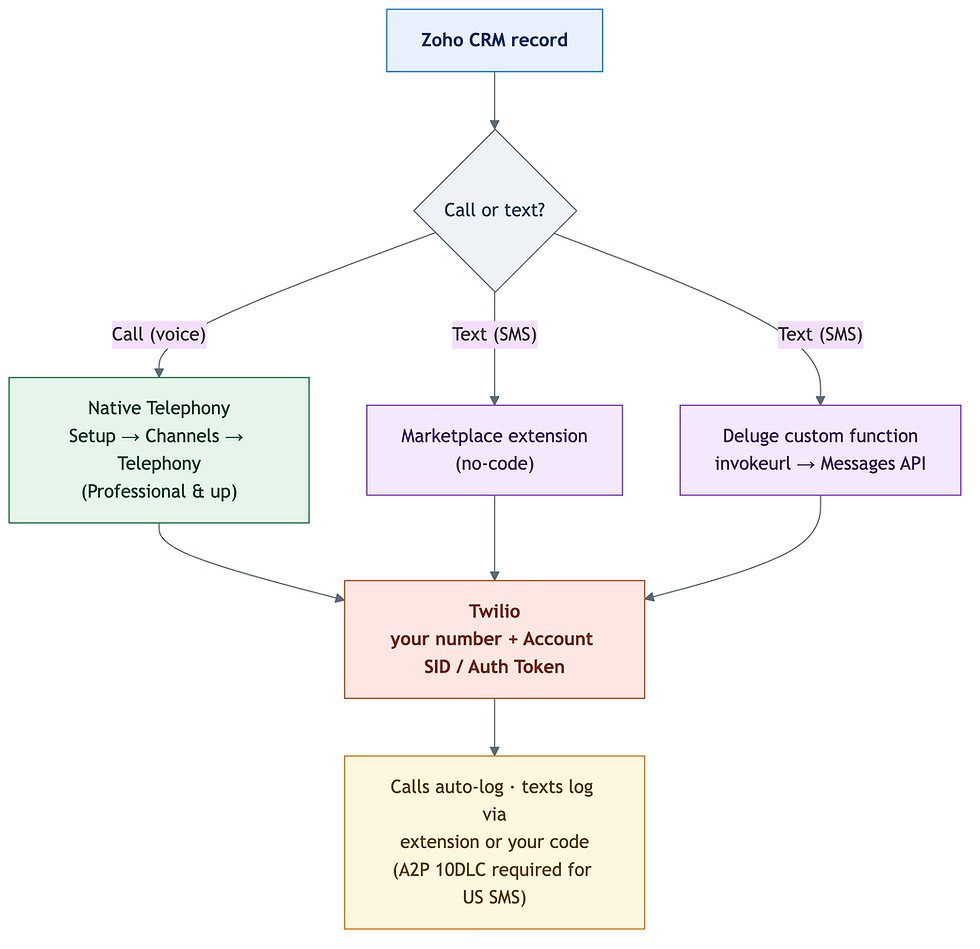
Voice and SMS are separate integrations. Plan for both if you need both.

Path 1: Calls — native Zoho Telephony
Twilio is a supported provider inside Zoho's built-in Telephony platform (PhoneBridge), so you don't buy anything extra — you connect Twilio directly.
In Twilio, confirm a voice-capable phone number and copy your Account SID and Auth Token from the Console.
In CRM, go to Setup → Channels → Telephony and choose Twilio.
Authorize with your Account SID and Auth Token.
Configure incoming calls — route to an IVR menu or straight to the assigned user.
Configure outgoing calls and map Twilio numbers to your CRM users.
Test click-to-call from a contact. Confirm the call pops up the caller's record and auto-logs when it ends.
What you get: click-to-call from any record, incoming call pop-ups with the caller's business-card view, automatic call logging, optional recording, and follow-up activities after the call. One scope limit to remember — telephony handles voice only. It does not send SMS.
Native telephony needs Professional edition or above (not Standard); confirm the current edition floor on Zoho's telephony FAQ before you plan around it.
Path 2: Texts — an extension or a Deluge function
For SMS you have two honest options.
No-code: a Marketplace extension. Several Twilio SMS extensions are listed on Zoho Marketplace (for example, "Twilio Send SMS for Zoho CRM" or a combined SMS & WhatsApp extension). Install one, enter your Twilio credentials, map your sending number, and you can send single or bulk texts from Leads, Contacts, and Deals — and trigger them from workflows. Feature sets vary by vendor, so pick the one whose reply-capture and templating match what you need.
Custom: a Deluge function. When you want texts fired by your own logic — a stage change, a Blueprint transition, an appointment reminder — call Twilio's API directly from a Deluge custom function. Twilio's Messages endpoint takes form-encoded params and HTTP Basic auth (Account SID as the username, Auth Token as the password):
sms = Map();
sms.put("To", contactMobile);        // E.164 format, e.g. +15558675310
sms.put("From", "+15017122661");     // your Twilio number
sms.put("Body", "Hi " + contactName + ", your technician is on the way.");

response = invokeurl
[
    url    : "https://api.twilio.com/2010-04-01/Accounts/YOUR_ACCOUNT_SID/Messages.json"
    type   : POST
    parameters : sms
    connection : "twilio_connection"
];
info response;   // Twilio returns a JSON body with the message sid + status
Store the returned message sid and status back on the record so your text history is auditable — with the custom path, logging is only as good as the code you write. This is the point where our Zoho CRM consultants usually get pulled in: making sure every text and reply lands on the timeline instead of disappearing.
The compliance step you cannot skip
If you send SMS to US numbers from an application, A2P 10DLC registration is mandatory. Twilio states it plainly: anyone sending application-to-person messages over a 10DLC number to the US must register. Skip it and carriers filter or block your traffic and add fees — your texts quietly stop landing. Register your brand and campaign in the Twilio Console before you go live, and honor opt-outs (Twilio auto-handles STOP, UNSTOP, and HELP, but consent is on you).
Why bother with all this instead of a plain call log? Because texts get read. SMS open rates are widely estimated around 98% — an industry-consensus figure inferred from delivery and response data rather than a single instrumented study, so treat it as directional — but even discounted, it dwarfs email. For a business chasing service confirmations and callbacks, that's the difference between reaching someone and leaving a voicemail.
Common mistakes
Expecting telephony to text. It won't. SMS is a separate build every time.
Skipping A2P 10DLC. Unregistered US traffic gets filtered — you'll think the integration is broken when it's actually just blocked.
Bulk-blasting from one long-code number. Long codes are throughput-limited; use a Twilio Messaging Service for volume.
Not logging texts. Native telephony logs calls automatically; SMS logging is your responsibility via the extension or your Deluge code.
Wiring Twilio into CRM cleanly — calls logging, texts compliant, both on the record — is the kind of Zoho integration work we do regularly, whether through native telephony, an extension, or custom Deluge. Want it built once, correctly? Book a free Zoho consultation and we'll scope calls and texts to your workflow.
How to integrate Zoho CRM with Twilio: the bottom line
Zoho and Twilio connect through two doors: native telephony for calls (Setup → Channels → Telephony, Professional and up), and an extension or a Deluge function for SMS — with A2P 10DLC registration required before you text US numbers. Decide whether you need voice, texts, or both, wire each on its own path, and make sure every call and message writes back to the record. Ready to connect them? Book a free Zoho consultation with our team.
By the CodeStringers Team — Zoho Experts & Custom Software. CodeStringers is a custom software engineering firm with a dedicated Zoho practice, writing from work we've actually shipped for clients.
Find out what one connected Zoho system would change in the way you run.
In a no-risk discovery we look at your CRM, finance and operations systems and who owns each part, and show what a connected system would do differently. You pay only if you proceed. Or see how we approach it.
More on the same problem:


Comments