INTEGRATED BUSINESS SOLUTION FOR CUSTOMER SUCCESS

Customer Success Software for Connected, Knowledge-Centered Support.

Unify every channel, knowledge resource, automation, AI insight, remote support, and self-service into one connected operating environment. Empower your team to resolve faster, delight customers, and drive measurable business outcomes.

  • Knowledge-centered support
  • Omnichannel support
  • Remote assistance
  • Measurable outcomes
Customer Success OS: the AI control plane we build, over the platforms it runs on and delivering through the channels to customer success teams that resolve from knowledge.Three layers, read bottom to top: the platforms it runs over (Support desk, CRM, Knowledge base, Remote assist, Analytics); the control plane, Customer Success OS, with its capabilities (Inquiry, Triage, Resolve, Feedback, Renewal, Human gates); and the channels it delivers through (Chat, Email, Phone, SMS, Social, Self-service), reaching customer success teams that resolve from knowledge.RUNS OVER THE PLATFORMS YOU ALREADY HAVESupport deskCRMKnowledge baseRemote assistAnalyticsWHAT WE BUILD: THE AI CONTROL PLANECustomer Success OSInquiryTriageResolveFeedbackRenewalHuman gatesDELIVERS THROUGHChatEmailPhoneSMSSocialSelf-serviceCustomer success teams that resolve from knowledge Customer Success OS: the AI control plane we build, over the platforms it runs on and delivering through the channels to customer success teams that resolve from knowledge.Three layers, read bottom to top: the platforms it runs over (Support desk, CRM, Knowledge base, Remote assist, Analytics); the control plane, Customer Success OS, with its capabilities (Inquiry, Triage, Resolve, Feedback, Renewal, Human gates); and the channels it delivers through (Chat, Email, Phone, SMS, Social, Self-service), reaching customer success teams that resolve from knowledge.RUNS OVER THE PLATFORMS YOU ALREADY HAVESupport deskCRMKnowledge baseRemote assistAnalyticsWHAT WE BUILD: THE AI CONTROL PLANECustomer Success OSInquiryTriageResolveFeedbackRenewalHuman gatesDELIVERS THROUGHChatEmailPhoneSMSSocialSelf-serviceCustomer success teams that resolve fromknowledge
AI-driven integrated business solutions

The AI control plane.

Customer Success OS is an AI control plane above your help desk, CRM and knowledge base. Every interaction starts with knowledge: the agent states the issue, the plane finds the article or drafts one while the agent solves, then routes, predicts escalations and watches renewal health. Agents work in chat; the screens stay for reading.

Company chat #support-desk
#support-deskCompany chat
  1. Priya N

    Customer says exports fail after the 4.2 update.

  2. CodeStringers AI Solution Controller

    Two articles match, 0.91 and 0.62. The first: clear the cache, re-run. Reply drafted; send?

    1 Yes, do it2 No3 Change something
  3. Priya N

    No article covers this one.

  4. CodeStringers AI Solution Controller

    Drafting the article from the ticket as you solve it. Confirm the three steps when done; the reviewer is pinged.

  5. Priya N

    Which accounts are at risk this quarter?

  6. CodeStringers AI Solution Controller

    Four, with the reasons and a proposed touch each. Renewal gate posted for the two over ninety days.

The support desk and the CRM renewal viewOur skin of the ticket
Ticket 4819, exports fail after updateSupport desk
Alder Ridge Outfitters, agent Priya N
Match
KA-⁠2210 at 0.91; KA-⁠1940 at 0.62
Linked article
none KA-⁠2210
Status
Open Closed
KA-⁠2210 used
14 times 15 times

Logged. Priya N, 1, 09:14. Reply sent, article linked, ticket closed. Nobody opened the knowledge base.

Ticket 4820, draft articleSupport desk
Custom fields do not map in the import
Article
none KA-⁠2311, draft
Category
Imports and data
Article status
Drafting Draft, three steps confirmed
Reviewer
none yet Marcus Odom, awaiting 1

Written as it is solved. Problem, environment, cause and fix come from the ticket thread; the reviewer sees a draft, not a blank page.

Renewal view, accounts by riskCRM
this quarter
Alder Ridge Outfitters
health 61: two breaches, KA-⁠1940 failed, renewal in 50 days
Corvid Labs
health 66: usage down 40 percent, one breach
Bluefin Logistics
health 70: renewal in 85 days, one open escalation
Renewal gate
posted for the two over ninety days two touches proposed, waiting for a 1

Proposed touch. A call this week for Alder Ridge; an adoption review for Corvid Labs. Each lands as a task on a 1.

Run log

  1. beat 1Two articles match, 0.91 and 0.62. The first: clear the cache, re-run. Reply drafted; send?
  2. beat 2Drafting the article from the ticket as you solve it. Confirm the three steps when done; the reviewer is pinged.
  3. beat 3Four, with the reasons and a proposed touch each. Renewal gate posted for the two over ninety days.
  1. What it controls.

    Customer says exports fail after the 4.2 update.

    help desk · CRM · knowledge base · analytics · company chat · email and portal

  2. Governance designed in.

    No article covers this one.

    Every dollar has a gate a person controls, caps are enforced in code below the gate, every action is logged with who approved it, and no credential is ever visible to a person or a prompt. The screens stay for administrators, reports and dashboards; the work moves to the conversation.

  3. Company chat.

    Which accounts are at risk this quarter?

    Works in the chat your team already uses. Email and other channels with an API on request.

  4. The ladder

    Agentic orchestration.

    Configured applications, then integrated solutions, then agentic orchestration. The control plane is the third rung, and this page is what it looks like in your industry.

    1. Configured applications
    2. Integrated solutions
    3. Agentic orchestration
    Watch the Demo Video
HIDDEN COSTS OF DISCONNECTION

The Hidden Costs of Disconnected Customer Support Operations.

When systems, data, and knowledge don’t work together, your team works harder—and your customers feel it.

Five pain points, one operational problem.

6hidden costs
  1. 01

    Siloed Channels.

    Customers repeat themselves across email, chat, calls, and social.

  2. 02

    High Operating Costs.

    More volume, more complexity, and higher cost to serve.

  3. 03

    Slow Time to Resolution.

    Too many handoffs, approvals, and switching between tools.

  4. 04

    Disconnected SLAs.

    Service targets are missed without unified visibility.

  5. 05

    Delayed Context.

    Limited insight into the customer history or service quality.

  6. 06

    Repeated Questions.

    Agents lack the answers they need—so customers wait longer.

NOT JUST TICKETS

You’re Not Just Managing Tickets. You’re Managing Onboarding, Support, Renewals, and Customer Confidence.

Customer success touches the full journey—from first contact to long-term loyalty. Your tools should help you deliver consistent, proactive, and personalized support at every step.

“Good service systems don’t just close tickets. They strengthen relationships.”

  • Resolve issues across every support channel
  • Deliver fast answers through knowledge and AI
  • Route work intelligently and consistently
  • Support self-service without losing context
  • Capture feedback that improves operations
  • Connect service with CRM, analytics, and workflow
SOLUTION ARCHITECTURE

Customer Success OS — The Connected Operating System for Modern Service Teams.

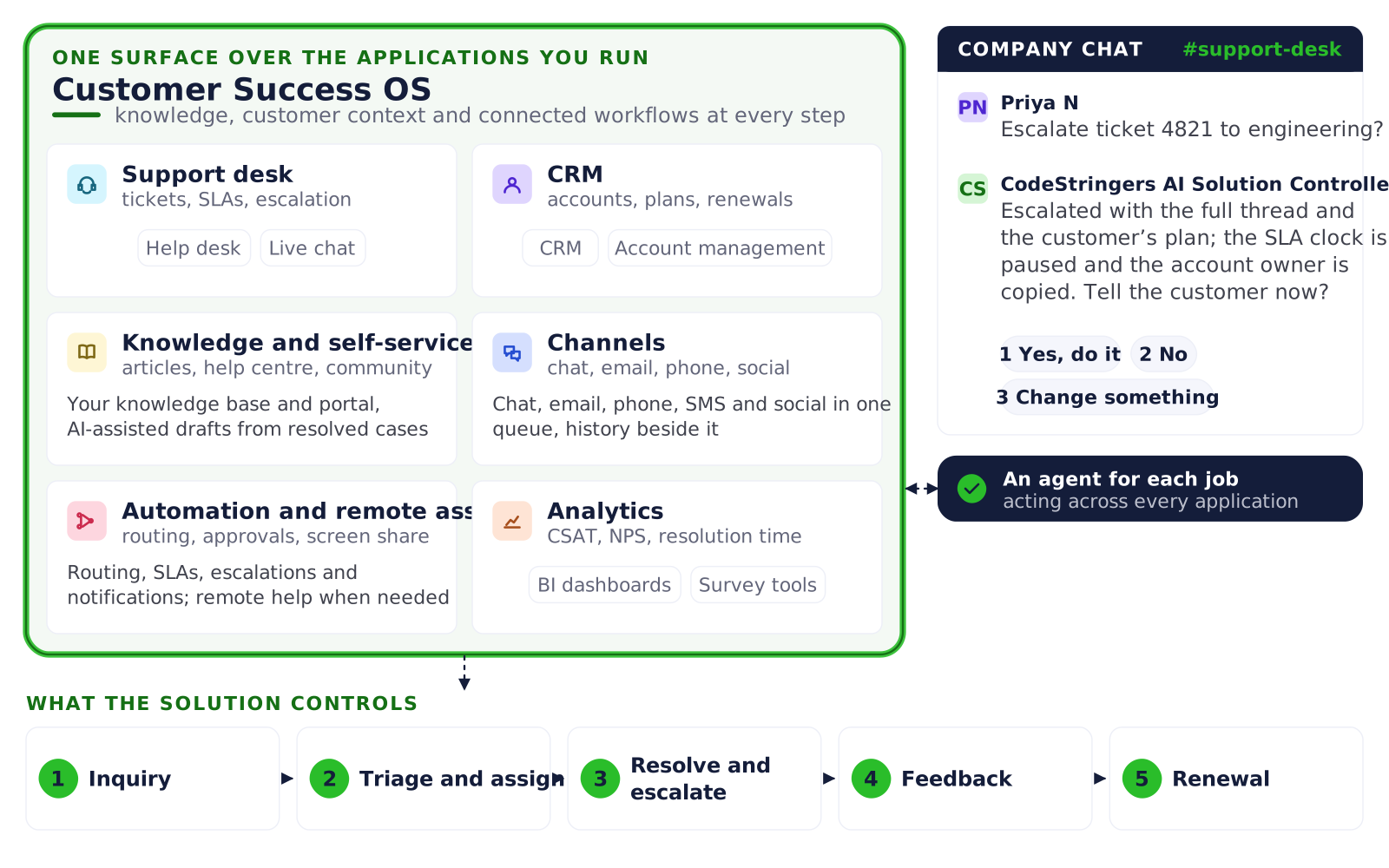
Architecture diagram of the Customer Success OS: one surface over a service team’s applications, six category boxes each naming the kinds of applications it runs on by category, never by vendor (support desk: help desk, live chat; CRM: CRM, account management; knowledge and self-service: your knowledge base and portal, AI-assisted drafts from resolved cases; channels: chat, email, phone, SMS and social in one queue, history beside it; automation and remote assist: routing, SLAs, escalations and notifications; remote help when needed; analytics: BI dashboards, survey tools), a company chat panel in which the AI agent escalates a ticket with its thread and asks whether to tell the customer, and the five workflow stages the solution controls: inquiry, triage and assign, resolve and escalate, feedback, renewal.

Customer Success OS.

One Platform. Your End-to-End Customer Success Experience.

REAL IMPACT / PROOF

How Teams Build a More Efficient Customer Success Operation on One Connected System.

Connected service operations improve consistency, response times, self-service adoption, and customer satisfaction. With the help desk at the center, teams reduce complexity, give agents what they need, and help customers help themselves.

5outcomes
  1. 01

    Faster first response.

    Resolve issues quickly across every channel.

  2. 02

    Reduced repeat tickets.

    Knowledge and context prevent repeat work.

  3. 03

    Higher self-service adoption.

    Customers find answers without waiting.

  4. 04

    Better customer visibility.

    Unified view of every interaction and history.

  5. 05

    Stronger retention signals.

    Proactive service builds loyalty and growth.

OPERATING MODEL

An Operating Model Built for Customer Success Operations.

A connected service operation should make support easier to deliver, easier to measure, and easier to improve. We design around the channels, knowledge, workflows, automation, and feedback loops that determine customer outcomes.

Knowledge first: the article that already exists is linked to the ticket and the ticket closes.
See it runKnowledge first: the article that already exists is linked to the ticket and the ticket closes.

Omnichannel Support.

Connect every channel into one unified experience.

Knowledge Management.

Capture, organize, and deliver answers that scale.

Ticketing & Resolution.

Smart routing, SLAs, and fast resolution workflows.

Self-Service Portals.

Enable customers to find help and engage on their terms.

Reporting & Analytics.

Data-driven insights to improve service performance.

Automation & Workflows.

Automate tasks and approvals to reduce manual work.

MORE THAN HELP DESK

More Than Help Desk. A Connected Customer Success Operating System.

A help desk works best when connected with the right apps and capabilities. Together, these tools create a seamless experience for your team and your customers.

Help Desk.

Powerful, multichannel help desk at the center.

CRM.

Unified customer data and relationship view.

Knowledge Management.

Centralized content for agents and customers.

Analytics.

Service dashboards and performance insights.

AI & Automation.

Smarter suggestions, summaries, and task automation.

Integrations & Custom Apps.

Connect the tools you use and the systems you need.

THE REAL BOTTLENECK

Where the Hard Part Isn’t the Technology. It’s the Disconnected Work.

We connect people, process, knowledge, and systems—so your team can deliver exceptional service at scale.

Process Clarity.
We map and standardize your service processes end-to-end, eliminating friction and duplicate work.
Knowledge Operations.
We bring structure to content, governance to knowledge, and AI to make it accessible inside the flow of work.
Continuous Improvement.
We measure what matters, identify opportunities, and help you evolve and optimize continuously.
WHY THIS ROLE MATTERS

Why This Role Matters More Than People Expect.

Customer success is where service quality, customer loyalty, internal efficiency, and knowledge maturity all converge. Get it right, and everything improves.

  • Build systems that teams actually use.
  • Strengthen retention and expansion.
  • Turn service data into operational insights.
  • Give agents the right context faster.
  • Reduce cost-to-serve (COS) through self-service.
  • Improve customer experience across channels.
How a solution is delivered

What a managed solution includes.

You adopt the paradigm; we run it. Every solution we sell is a managed solution: the software, its integration to the platforms you already run, the people who keep it running, and the advice that keeps what goes into it sound. One subscription, four parts.

  • The software.

    The solution and its surface: the agents, the routines, the gates, and the record of every run. Released as versions, tested before each one reaches you.

  • The integration.

    Connected to the platforms you already run, CRM, marketing, finance, help desk, through their own APIs, with every write read back and logged.

  • Managed operations.

    The people and the monitoring that keep it running: connections tested daily, a regression fixed before you see it, upgrades applied, administration done, questions answered.

  • Advisory.

    The strategic work that keeps the inputs sound. A system runs what it is given, and poorly conceived themes produce failed campaigns, so a senior person reviews the plan, the targets and the results with you.

How it is sold

As a subscription: one monthly price for the software, the integration, the operations and the advice, in tiers for each solution set by how much of it you use in a month. No hourly billing and no change order for a routine fix.

Who it is for

Operationally complex businesses that want the outcome run for them, not another application to staff. If what you need today is hours of configuration or integration work on your own platform, that is on our services pages and we take it on; the managed solutions are where we are going. Our services

EXPLORE RELATED CAPABILITIES

Help Desk Services.

Implementation, customization, optimization, and managed support.

Analytics Services.

Dashboards, reports, and insights that drive action.

Knowledge Management.

Create, manage, and deliver learning and help content.

Business Systems Integration.

Connect your core applications with the apps and systems your business depends on.

Questions people ask.

What is knowledge-centered support?

Knowledge-centered support, or KCS, is a practice in which the knowledge base is created and maintained as a by-product of solving tickets rather than as a separate writing project. Every interaction starts by searching for an existing article; when none fits, the article is drafted from the ticket as the agent solves it and reviewed before publishing. Over time most questions are answered by linking an article, which is what reduces repeat tickets and time to resolution.

How is customer success software different from a help desk?

A help desk manages tickets: intake, routing, SLAs and resolution. Customer success software covers the whole relationship: onboarding, support, adoption, renewals and the signals that an account is at risk. The help desk stays at the centre here, with the knowledge base and the CRM joined to it, so that a ticket, an article and a renewal date are visible together. The aim is retention and confidence, not only closed tickets.

How does it identify accounts at risk?

A health score per account combines signals the systems already hold: SLA breaches, failed knowledge articles, usage trends, open escalations and days to renewal. Accounts below a threshold are listed with the reasons and a proposed touch, such as a call this week or an adoption review, and a renewal gate is posted for accounts inside a set window. A person approves each touch, and it lands as a task in the CRM.

Does it replace our help desk or CRM?

No. It runs above the help desk, the CRM and the knowledge base you already have, plus analytics, company chat, email and the customer portal, connected through their published APIs with keys from your own instance. Replies, article links and ticket status are written to the help desk and read back; renewal tasks land in the CRM. Agents work in chat; the application screens stay for administrators, reading and reporting.

How does article drafting from a ticket work?

When no article matches a ticket, the plane drafts one from the ticket thread as the agent solves it: the problem, the environment, the cause and the fix. The agent confirms the steps when done, a named reviewer is pinged and sees a draft rather than a blank page, and the article is published after review. The ticket is linked to the article, so the next occurrence closes by linking rather than by solving again.

What does implementation involve?

Discovery first: following recent tickets from first contact to resolution across your help desk, knowledge base and CRM to show where answers are repeated and context is lost. Then the knowledge matching, routing and health rules are configured to your products and tiers, connections are made and agents are trained on the chat workflow. One queue goes live first. Timeline follows the number of channels, products and systems involved.

READY TO IMPROVE SERVICE

See where your service operation and systems stop agreeing.

No-risk discovery. Real insights. Practical next steps—whether you work with us or not.

Or just ask

Talk to us about this solution.

One question is enough. Say who you are and a person who has run this reads it and replies within one business day.

The rest of the form follows your answer.

A new client, or thinking about becoming one

Never shared. Never sold.

A solution, a service, or not sure yet.

Platforms you run today

Pick every one that applies. Choosing one is an answer too.