Zoho CRM Web to Lead vs API: Which Lead Capture Should You Build?
Updated: 5 hours ago
A client called us in a mild panic last spring: their "Contact Sales" page was quietly dropping about one in eight submissions, and nobody could say why. We opened the hood and found a Zoho CRM Web Form doing exactly what it was built to do — accept a name, an email, and a message, and create a Lead — while a marketing script tried to bolt validation and routing on top of it in the browser. That mismatch is the whole reason the Zoho CRM Web Forms vs API for lead capture decision matters, and it's the kind of thing a Business systems consultant gets asked to untangle more often than you'd think.
Here's the definitional version. A Zoho CRM Web Form is a no-code, Zoho-hosted form that writes submissions straight into a CRM module. The Zoho CRM REST API is a programmatic endpoint your own code calls to create records. Both create leads. They are not interchangeable, and choosing wrong costs you either flexibility or weeks of unnecessary engineering.
What's the real difference between Web Forms and the API?
A Web Form is a hosted HTML form Zoho generates for you; you paste it on a page and submissions land in your CRM with zero code. The API is a POST request your application sends to a Zoho endpoint. One is a product feature aimed at marketers; the other is an integration surface aimed at developers. The gap between them is where every decision lives.

Web Forms live inside the CRM's setup UI. You drag fields, pick a module, set a landing URL, and Zoho hosts the submission logic. They support the Leads, Contacts, Cases, and any custom modules in your account (Zoho). No server, no auth handshake, no deployment.
The REST API is the opposite posture. You authenticate with OAuth, build a JSON payload, and send it to an endpoint like {api-domain}/crm/v8/Leads (Zoho). Your code owns everything that happens before Zoho sees the data — which is exactly the point.
How do Zoho CRM Web Forms work, and where do they win?
Web Forms win on speed and total cost of ownership for straightforward, page-based capture. You configure the form in CRM setup, embed the generated snippet, and you're collecting leads the same afternoon — no developer, no infrastructure, no maintenance window. For a marketing landing page or a "request a demo" block, that's usually the right tool.
The feature set is more capable than people assume. You can add reCAPTCHA to fight spam — one per form, available across all paid editions — and standard CAPTCHA on paid plans too (Zoho). File uploads are allowed, up to 3 files totaling 20 MB per submission. You can wire an approval step so incoming leads sit in a queue for a human to accept or reject before they hit the pipeline, and double opt-in is available on paid editions to confirm an email before the record is trusted.
The constraints are just as important. Web Forms accept a fixed menu of field types — Text, Email, Phone, Pick List, Date, Checkbox, and similar — but Lookup, Auto Number, and Formula fields can't be placed on a form (Zoho). The number of active web forms per module depends on your edition, and the form's landing URL can't exceed 255 characters. Validation is client-side and shallow: the form checks that an email looks like an email, not that the domain is real, not that this person already exists in your CRM, not that the deal size field makes sense.
That shallowness is fine for a contact page. It's a liability the moment your data quality depends on logic that has to run before the record is created.
What does the Zoho CRM REST API give you that Web Forms can't?
The API hands you the entire pre-insert moment. Before a lead is written, your code can validate against external systems, deduplicate against existing records, enrich the payload, normalize phone formats, and decide whether CRM automations should even fire. None of that is possible with a Web Form, because the form's logic ends at "does this field look valid."
Take dedup. With the API you query for an existing Lead or Contact by email, then choose to update instead of insert — or you use Upsert with a duplicate-check field so the platform merges rather than creating a twin. A Web Form just creates another record and leaves the mess for later.
Then there's automation control. When you insert through the API you can pass a trigger parameter to decide which automations run — workflows, approvals, blueprints, and so on — and passing an empty trigger: [] array creates the record while suppressing every workflow (Zoho). That single detail matters enormously for bulk imports and system-to-system sync, where you emphatically do not want ten thousand "new lead" emails firing. Web Forms give you no such switch.
A minimal insert looks like this — one lead, created with a POST:
curl "https://www.zohoapis.com/crm/v8/Leads" \
  -X POST \
  -H "Authorization: Zoho-oauthtoken 1000.xxxx" \
  -H "Content-Type: application/json" \
  -d '{
    "data": [{
      "Last_Name": "Okafor",
      "Company": "Meridian Freight",
      "Email": "d.okafor@meridianfreight.com",
      "Lead_Source": "Partner Portal"
    }],
    "trigger": []
  }'
The API also batches. A single insert call carries up to 100 records (Zoho), which is how you move real volume without hammering the endpoint one lead at a time.
Web Forms vs API: the side-by-side comparison
The honest way to compare them is dimension by dimension, because neither is better across the board — they're better at different jobs. The table below is the summary we walk clients through before we write a line of code.
Dimension | Zoho CRM Web Forms | Zoho CRM REST API |
Setup | No-code, minutes, in CRM setup | OAuth + code + deployment |
Who builds it | Marketer / admin | Developer |
Cost to run | Included; no infrastructure | Included calls, but you build & host the caller |
Validation | Client-side, field-shape only | Server-side, arbitrary logic before insert |
Deduplication | None (creates duplicates) | Query / Upsert against existing records |
Volume | Page-submission scale | Up to 100 records per call, batched |
Workflow control | Automations always fire | trigger: [] suppresses them at will |
Source | Only a hosted web page | Your app, a portal, or any system |
Security surface | Public form + reCAPTCHA | OAuth-scoped, server-to-server |
Maintenance | Zoho owns it | You own the caller |
Read down the "Web Forms" column and you see a tool optimized for zero effort. Read down the "API" column and you see a tool optimized for control. That framing decides almost every case.
What do Web Forms and the API actually cost?
Neither Web Forms nor standard API access is a paid add-on — both come with your CRM edition — so the real cost question is about API credits and your own engineering time, not license fees. Web Forms cost you nothing to run. The API costs you a share of a daily credit budget plus the effort to build and maintain the code that calls it.
Zoho meters the API in credits, not raw request counts. Insert and update operations are cheap per record: 1 credit covers every 10 records written (Zoho). The daily budget scales with your edition and user count — a Free account gets 5,000 credits a day, while an Enterprise account gets 50,000 plus 1,000 per user (capped at 5,000,000) (Zoho). For lead capture, credits are almost never the bottleneck; at 1 credit per 10 inserts, even a busy pipeline barely dents the budget.
Concurrency is the subtler limit. Simultaneous API calls are capped by edition — 5 on Free up to 25 on Ultimate — with a sub-concurrency ceiling of 10 for resource-heavy operations like insert, update, and upsert across every edition (Zoho). Translation: a naive integration that fires hundreds of parallel single-record inserts will get throttled, while a well-built one that batches 100 records per call sails through. The cost of the API isn't the credits. It's building it correctly.
That's the honest tradeoff. Web Forms are free in every sense. The API is nearly free to run and genuinely expensive to build well — which is precisely why it's worth engaging Zoho CRM consultants before you commit to a custom integration you'll maintain for years.
Book a free Zoho consultation — if you're weighing a form against a full Zoho integration, we'll help you scope the right one: start a no-risk discovery.
A worked example: 40,000 partner leads a month
Consider a logistics client sending roughly 40,000 leads a month into Zoho from a partner portal, each needing a duplicate check and territory assignment before it lands. A Web Form can't touch this job; the API is the only viable path, and the design details are where the money is saved or wasted.
Done naively, the integration posts one lead per request. At 40,000 leads, that's 40,000 calls, each racing the sub-concurrency ceiling of 10 concurrent insert operations, and you spend engineering time chasing HTTP 429 throttling errors instead of shipping. Done well, the portal buffers submissions and posts them in batches of 100 — the per-call maximum — which collapses 40,000 calls into 400. Each batch runs a dedup query first, sets Lead_Source and territory in the payload, and passes a scoped trigger array so only the assignment workflow fires, not the full automation cascade.
The credit math is almost comic in its cheapness: 40,000 inserts at 1 credit per 10 records is 4,000 credits — a rounding error against an Enterprise daily budget in the millions. The expensive part was never Zoho's meter. It was the buffering, batching, dedup, and error handling, and that's exactly the work a Custom software developer does that a form builder can't.
Zoho CRM Web Forms vs API: which to choose for lead capture?
Pick Web Forms when the lead originates on a web page you control, volume is ordinary, and the CRM's built-in validation is enough. Pick the API when the lead originates in another system, when logic has to run before the record is created, or when you need control over deduplication, batching, or which workflows fire. The decision tree below is the one we actually use.
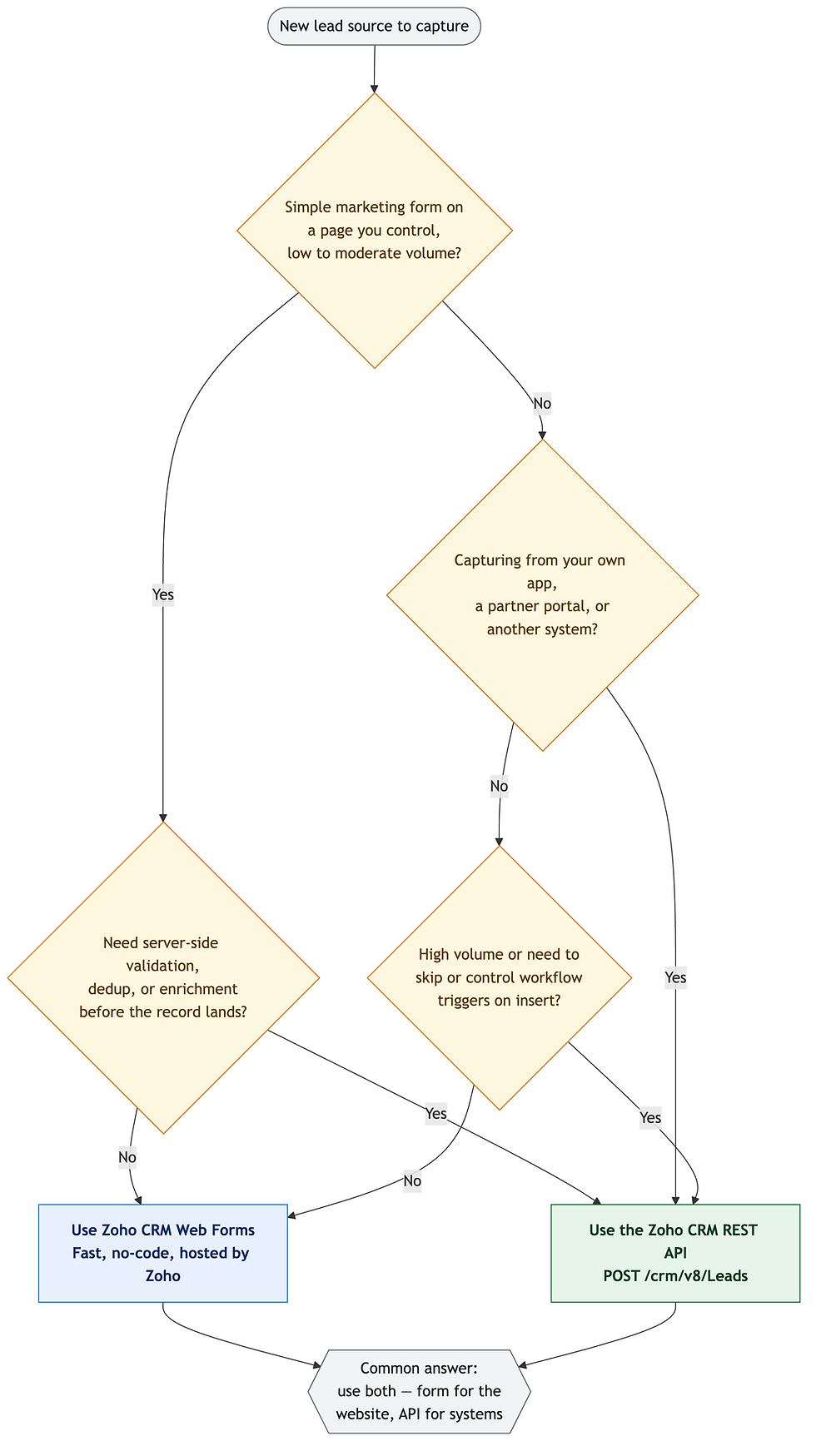
Notice where the tree lands most often: both. A company runs Web Forms on its marketing site and the API for everything system-to-system. That isn't indecision — it's the correct architecture. The two tools cover different halves of the same problem, and the strongest lead-capture setups we build use each where it's strongest. If your leads only ever arrive through your own website and you don't need pre-insert logic, you may never need the API at all, and paying to build one would be waste.
Where each genuinely wins
Web Forms win on time-to-value, zero maintenance, and marketer autonomy. A non-technical admin can launch a spam-protected, approval-gated lead form in an afternoon with reCAPTCHA and file uploads, and never call a developer again. For the classic "capture inquiries from our website" use case, reaching for the API is over-engineering.
The API wins on control, data quality, and reach. It's the only option when leads come from your product, a partner portal, an ad platform, or a legacy database; the only way to dedup before insert; and the only way to suppress or scope automations on bulk loads. It's also the foundation once lead capture grows into two-way sync, and it pairs naturally with server-side automation — the same server-side vs browser-side split we cover for Deluge and JavaScript. If you're still shaky on how Zoho models an incoming inquiry in the first place, our primer on what leads are in Zoho CRM is a useful companion, and teams standardizing on Google will want our guide to integrating Zoho CRM with Google Workspace.
The trap is treating this as a loyalty test — "we're an API shop" or "we keep it no-code." The lead source dictates the tool, not your team's habits.
The bottom line
Zoho CRM Web Forms and the REST API aren't rivals; they're two capture surfaces for two different origins. Use Web Forms for page-based, no-code lead collection where the built-in validation suffices, and reach for the API whenever leads come from another system or need real logic — dedup, enrichment, workflow control — before they're created. Most mature setups run both.
If you're deciding which surface fits your lead sources, or you've outgrown a form and need an integration built to scale, our team can help you scope it before you spend a dollar of engineering. Book a free Zoho consultation and we'll map it with you: start a no-risk discovery.
Find out what one connected Zoho system would change in the way you run.
In a no-risk discovery we look at your CRM, finance and operations systems and who owns each part, and show what a connected system would do differently. You pay only if you proceed. Or see how we approach it.
More on the same problem:


Comments